Signing on
When your deployment is completed, you will receive a unique link to access Administrative Analytics along with your login information.
If your institution uses SSO (single sign-on), Administrative Analytics may be configured to work with those credentials.
Permissions
Administrative Analytics uses a global sidebar that separates the staff functions (above the line) from the admin functions (below the line). What you see depends on your user permissions:
Basic Access 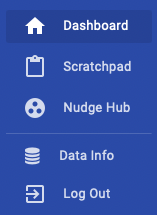 | Full Access 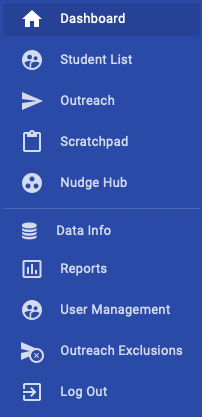 |
If you suspect that you are missing access permissions that you need, contact your Analytics administrator to check User Management.
Finding Help
Click the Help button in the lower right corner of any page to access help and updates about new features and changes.
If this in-app help does not work with your assistive devices or software, you can reach the same information by browsing to the Civitas Learning Hub, hub.civitaslearning.com.